https://huggingface.co/nanonets/Nanonets-OCR-s
nanonets/Nanonets-OCR-s · Hugging Face
Nanonets-OCR-s is a powerful, state-of-the-art image-to-markdown OCR model that goes far beyond traditional text extraction. It transforms documents into structured markdown with intelligent content recognition and semantic tagging, making it ideal for dow
huggingface.co
문서를 구조화된 마크다운으로 변환하는 qwen2.5vl:3b 모델 기반 nanonets OCR 모델이 나와서 바로 테스트해 봤습니다.
수식은 LaTeX형태로 변환, 이미지는 설명추가, 표는 markdown 표로 출력합니다.
최근 수식을 인식하지 못하는 문제를 겪던 도중 수식을 처리해 준다는 nanonets OCR 모델이 나왔습니다.
바로 코드 보면서 모델 load부터 pdf OCR까지 가보겠습니다.
from PIL import Image
from transformers import AutoTokenizer, AutoProcessor, AutoModelForImageTextToText
# pip install git+https://github.com/huggingface/transformers accelerate
model_path = "nanonets/Nanonets-OCR-s"

model = AutoModelForImageTextToText.from_pretrained(
    model_path,
    torch_dtype="auto",
    device_map="auto",
    attn_implementation="flash_attention_2"
)
model.eval()

tokenizer = AutoTokenizer.from_pretrained(model_path)
processor = AutoProcessor.from_pretrained(model_path)
transformers를 사용해서 모델을 로드합니다.
from pdf2image import convert_from_path

# OCR 함수
def ocr_page_with_nanonets_s(image: Image.Image, model, processor, max_new_tokens=4096):
    prompt = """Extract the text from the above document as if you were reading it naturally.
    표나 차트는 가능한 한 Markdown 표 형식으로 정리하시오.
    Return the equations in LaTeX representation.
    If there is an image in the document and image caption is not present, add a small description of the image inside the <img></img> tag; otherwise, add the image caption inside <img></img>.
    Watermarks should be wrapped in brackets. Ex: <watermark>OFFICIAL COPY</watermark>.
    Page numbers should be wrapped in brackets. Ex: <page_number>14</page_number> or <page_number>9/22</page_number>. Prefer using ☐ and ☑ for check boxes."""

    messages = [
        {"role": "system", "content": "You are a helpful assistant."},
        {"role": "user", "content": [
            {"type": "image", "image": image},
            {"type": "text", "text": prompt},
        ]},
    ]
    text = processor.apply_chat_template(messages, tokenize=False, add_generation_prompt=True)
    inputs = processor(text=[text], images=[image], padding=True, return_tensors="pt")
    inputs = inputs.to(model.device)

    output_ids = model.generate(**inputs, max_new_tokens=max_new_tokens, do_sample=False)
    generated_ids = [output_ids[len(input_ids):] for input_ids, output_ids in zip(inputs.input_ids, output_ids)]

    output_text = processor.batch_decode(generated_ids, skip_special_tokens=True, clean_up_tokenization_spaces=True)
    return output_text[0]

# PDF 전체 페이지 OCR 수행
def ocr_pdf_with_nanonets(pdf_path: str, model, processor, max_new_tokens=4096):
    images = convert_from_path(pdf_path, dpi=300)
    results = []
    for i, img in enumerate(images):
        print(f"Processing page {i+1}/{len(images)}...")
        page_text = ocr_page_with_nanonets_s(img, model, processor, max_new_tokens)
        results.append((i+1, page_text))
    return results

# 실행
pdf_path = "KDS 11 80 05 콘크리트옹벽(20.12).pdf"
results = ocr_pdf_with_nanonets(pdf_path, model, processor, max_new_tokens=15000)

# 결과 출력 또는 저장
for page_num, text in results:
    print(f"\n--- Page {page_num} ---\n{text}\n")
국토교통부의 설계문서를 사용하였습니다.
21pg pdf를 image로 변환해 주고 nanonets를 사용해 OCR 합니다.
prompt = """Extract the text from the above document as if you were reading it naturally.
    표나 차트는 가능한 한 Markdown 표 형식으로 정리하시오.
    Return the equations in LaTeX representation.
    If there is an image in the document and image caption is not present, add a small description of the image inside the <img></img> tag; otherwise, add the image caption inside <img></img>.
    Watermarks should be wrapped in brackets. Ex: <watermark>OFFICIAL COPY</watermark>.
    Page numbers should be wrapped in brackets. Ex: <page_number>14</page_number> or <page_number>9/22</page_number>. Prefer using ☐ and ☑ for check boxes."""
가장 중요한 prompt입니다.
qwen 기반이라 그런지 한국어로 출력하라는 말 넣지 않아도 한국어로 잘 나옵니다.
수식은 LaTeX, 표 차트는 markdown, 이미지는 설명 추가, 워터마크 추출, 체크박스 버튼 변환을 요구하는 prompt입니다.
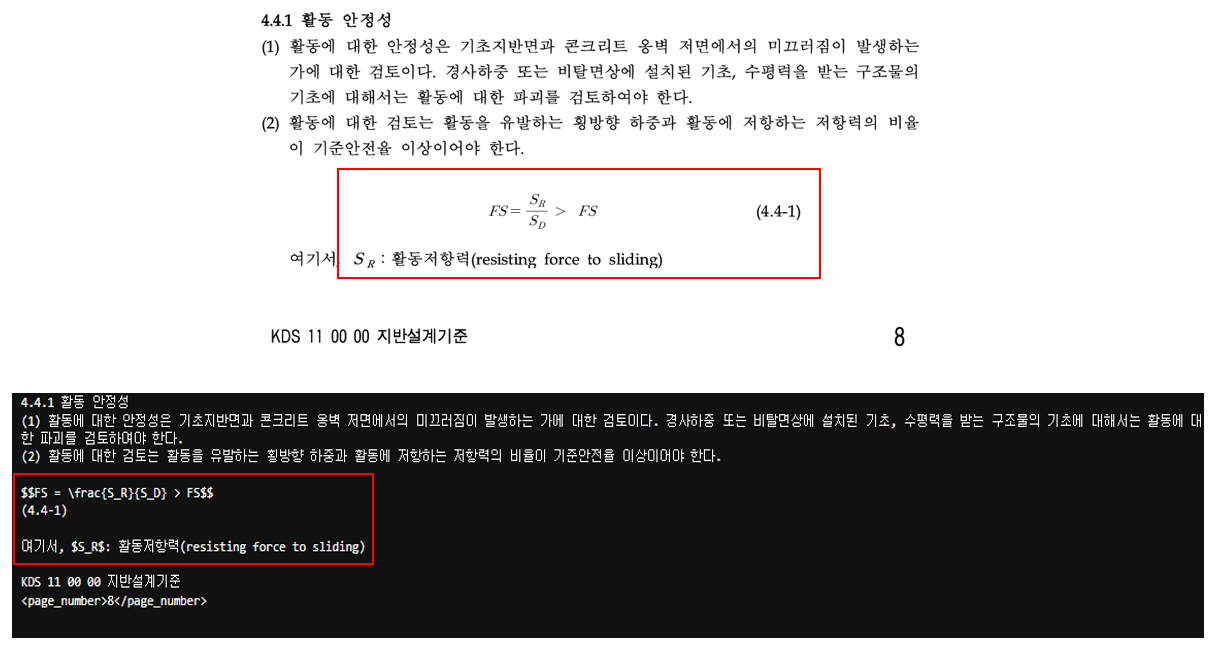
위와 같이 한글로 출력을 하고 수식이 LaTeX 형식으로 나옴을 볼 수 있습니다.
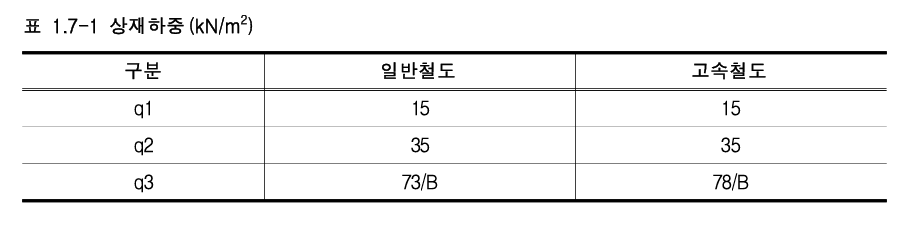
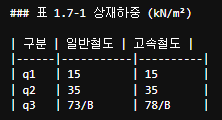
표는 markdown형식으로 출력됩니다.
Llm 기반 OCR이 요즘 사용이 편하고 성능도 매우 좋습니다.
Prompt를 어떻게 하느냐에 따라 결과가 많이 바뀌어서 테스트가 재밌네요.
GPU: Nvidia H100(80GB), VRAM 16GB 사용
고사양 GPU를 사용하다 보니 qwen2.5vl:72B를 사용해서 위 내용을 테스트해 봤는데, 파인튜닝 없이도 nanonets보다 OCR 잘 해내더라고요. 특히 chart -> markdown 성능에서 많이 차이 납니다.
대신 4bit 양자화된 모델을 사용했는데도 VRAM 55GB 정도 실소요되었습니다.
qwen3.5vl 모델도 나오게 된다면 매우 기대되네요.
'AI > LLM' 카테고리의 다른 글
| Unstructured PDF (multi-modal-rag) 사용 해보기 (0) | 2025.04.30 |
|---|---|
| Cogito-70B llm 모델 성능 테스트 해보기 (0) | 2025.04.11 |
| 임베딩 모델 한국어 성능 비교(BGE-M3 vs E5-large) (0) | 2025.04.10 |
| QWQ vs Llama3.3 Ollama 기반 Agentic RAG 해보기 (0) | 2025.04.09 |
| PyMuPDF4LLM vs PyMuPDFLoader(PDF loader 비교) (0) | 2025.04.04 |